JISOO Addicted Dance meme generator
Put your cast into the original ADDICTED hallway dance.
Watch the scene. Choose your part.
Replace the characters you choose. Unselected characters stay in the original scene.
The 15-second duet uses 0:15–0:30 of the original. You can also choose the full performance.
Sound starts muted. Use the player to hear the original soundtrack.
| Duration | Resolution | Credits | Price (USD) |
|---|---|---|---|
| 15 seconds | 480p | 50 credits | $4.98 |
| 15 seconds | 720p | 100 credits | $9.98 |
| 38.44 seconds | 480p | 100 credits | $9.98 |
| 38.44 seconds | 720p | 200 credits | $19.98 |
Prices before applying existing credits
Existing credits reduce the amount to pay. Choose an option to see your final quote.
Make it yours.
Choose a clear photo of one person for each role you want to replace.
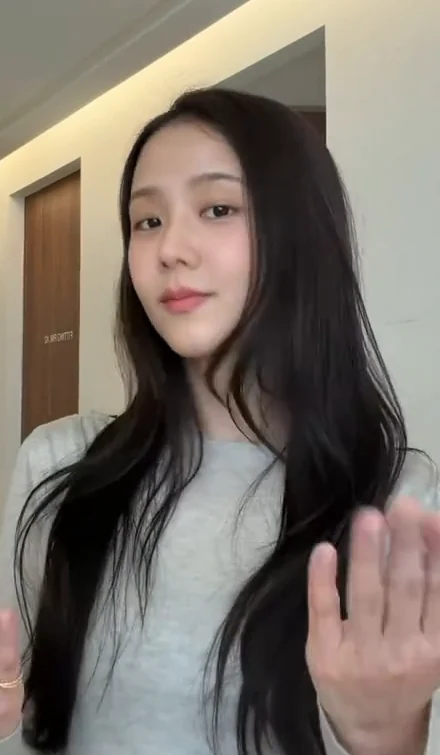
Gray-top performer
The dark-haired performer who opens the hallway clip.
Original kept
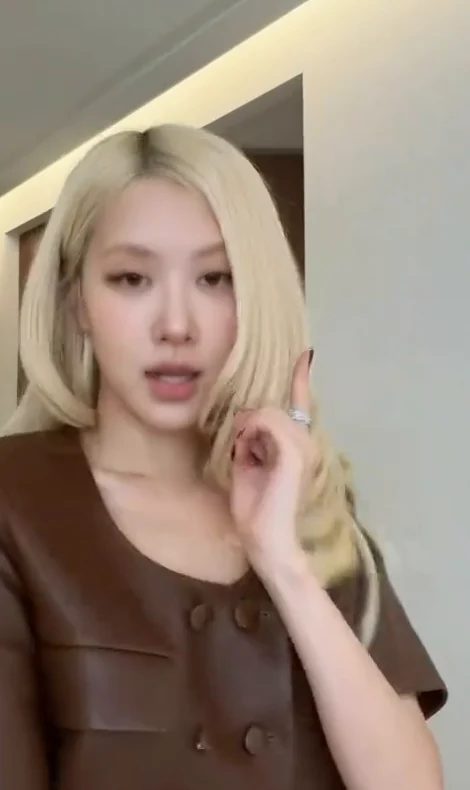
Brown-top performer
The light-haired performer who joins the hallway dance.
Original kept
JPG, PNG or WebP · Up to 8 MiB per photo · One person per photo
Your video
No MemeRecast watermark
- Output
- 15 seconds · 480p
- Credit cost
- 50 credits
- Sound
- Original soundtrack
- Video price
- $4.98 USD
AI results vary. Exact likeness, clothing, movement and lip-sync are not guaranteed.
Choose at least one role to replace. Leave other roles without a photo to keep their original characters.
You can leave this tab once generation starts. Find progress and the finished video in My videos.
Private files. Photos are available for up to 48 hours; videos for up to 7 days.
JISOO Addicted Dance questions
Where does this version of JISOO Addicted Dance come from?
The ADDICTED hallway dance features two performers alternating close-up hand gestures before joining for turns and shoulder contact. This template offers a duet excerpt and the full performance posted by @roses_are_rosie, whose caption names JISOO, ROSÉ and ADDICTED.
Watch the selected source video
Documented appearance of this AI meme
This date refers to the documented AI meme variant. The source performance may be older. Appearance-date source
Why does this scene work as a meme?
Alternating solo entrances let two people each take a turn, while the shared turns and hand gestures make the duet recognizable even when the cast changes.
How do I make my own JISOO Addicted Dance video?
Watch the original scene, choose the roles you want to replace and upload one photo for each selected role. Choose your video options, review the total and start generation. Follow its progress in My videos.
Who can I replace?
You can replace Gray-top performer and Brown-top performer. Each selected role needs its own photo. Unselected characters keep their original appearance.
Match your photos to these roles in the original video.
- Gray-top performer The dark-haired performer who opens the hallway clip. Show the face, outfit and as much of the body as possible.
- Brown-top performer The light-haired performer who joins the hallway dance. Show the face, outfit and as much of the body as possible.
Which video options and credit costs are available?
This template offers the following options. Credits cover the finished video, regardless of how many roles you select. Review the final quote before starting.
The 15-second duet uses 0:15–0:30 of the original. You can also choose the full performance.
- 15 seconds · 480p · 50 credits
- 15 seconds · 720p · 100 credits
- 38.44 seconds · 480p · 100 credits
- 38.44 seconds · 720p · 200 credits
Does the video keep the original sound?
Yes. The finished video uses the source scene’s soundtrack. The preview starts muted. Use its volume control to listen.
AI results vary. Exact likeness, clothing, movement and lip-sync are not guaranteed.
What kind of photo should I use?
Upload one clear photo per selected role, with even lighting. Each photo must contain one person. Animal-only and object-only images are not supported. Use your own images or ones you have permission to use.
Are my photos and videos public?
Your files are private to your account. Uploaded photos are available for up to 48 hours after upload, and videos for up to 7 days after you start a generation. Download clips you want to keep.
How do I request a refund?
Open Help & support and select Refund request. Choose a reason and include your video link or order reference, with a description of the problem. You can also select Request a refund next to a paid order in your payment history. If you cannot sign in, email support@memerecast.com. Each request is reviewed individually under our Terms of Service. Approval is not automatic. For confirmed technical generation failures, we restore the credits used for that attempt.
Request a refundWhat happens if generation fails?
Confirmed generation failures restore the credits used for that attempt. If a job’s outcome is uncertain, it goes to review instead of starting another paid attempt.